Suno Rec
Saving a few hundred of your own Suno tracks by hand is a weekend. This records them for you — silently, many at a time, each one landing as a tagged MP3.
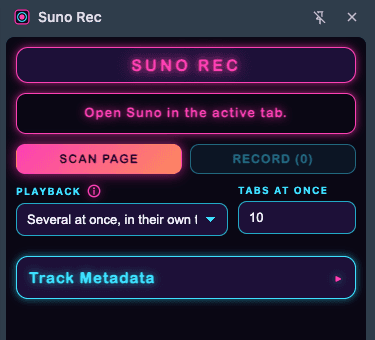
How It Works
Built around one constraint: the audio can only be taken while it plays.
Captures what the player decodes
The file behind each track is encrypted at rest on the CDN, so downloading it is useless. The extension records the decoded audio instead, straight from the page's own player.
AudioWorklet tap
A worklet injected into the page reads PCM off the audio graph in real time and streams it to the background worker. No media re-encoding round trip, no lost quality.
Silent by design
The tap's output runs at gain 0. A dozen tracks can be playing at once and the machine stays completely quiet — the recording is unaffected.
Pool of worker tabs
One page has one player, so parallelism means more tabs. A pool of 1–12 tabs draws from the queue in its own unfocused window, with staggered launches to stay under the API's rate limits.
Tagged MP3s
Every capture is encoded to MP3 in the browser and written out with ID3 metadata, named after the track it came from. No renaming pass afterwards.
Side panel workflow
Scan the open library page, review what was found, pick the playback mode and how many tabs to use, then hit record. Progress stays visible in Chrome's side panel.
Survives the long run
Batches take hours, so state is persisted and every failure is recorded with enough diagnostics to tell a stalled tab from a track that genuinely will not play.
Tested where it counts
The queue, the ID3 writer, the MP3 encoder, the transfer path, and the guards all have unit tests — the parts where a silent bug costs you a whole overnight batch.
Tech Stack
TypeScript
Type safety
React
Side panel UI
Vite
Build tool
Chrome MV3
Service worker, offscreen, side panel
Web Audio API
AudioWorklet capture
Media Source Extensions
Playback analysis
lamejs
In-browser MP3 encoding
Vitest
Unit tests